Web Technologies

BLOG for Web Technologies

Freewares, Free E-Books Download, SEO, Tips, Tricks, Tweaks, Latest News, .Net, PHP, ASP, ASP.Net, CSP, MS SQL Server, MySQL, Database
earnptr.com
Wednesday, September 10, 2008
11 Ebooks on Web Development, AJAX, ASP.NET, C++, C#, and XSLT
Here is a Google Groups post that contains links to 11 freely available ebooks covering Web Development and Programming, AJAX, ASP.NET, C++ Programming, Microsoft Visual Studio, Visual C Sharp (C#), and XSLT.

To access the download link for the ebooks on rapdishare.de, click on the Free button at the bottom of the rapidshare page, wait about 30 seconds, then enter the 3 character code and click on the download button. (You will need to wait 1 hour between large downloads.). To uncompress .rar files you can use 7-Zip, available here: www.7-zip.com/download.html.

Labels: , , , , ,

posted by WebTeks @ 5:26 AM   0 comments
Saturday, March 1, 2008
Data Retrieve from Mysql using AJAX with PHP
This example is useful to those programmers who want to use ajax in php.

Tested on
Browse Name: Opera / 8.53
Browse Name: Mozilla/5.0 (Windows; U; Windows NT 5.1; en-US; rv:1.8.0.2)
Gecko/20060308 Firefox/1.5.0.2
Browse Name: Microsoft Internet Explorer / 6.0
Browse Name : Mozilla 1.5


GetCustomerData.php


<html>
<head>
<title>Get Customer Data</title>

//customer ID
$sID = $_GET["id"];

//variable to hold customer info
$sInfo = "";

//database information
$sDBServer = "your_server_name";
$sDBName = "your_database_name";
$sDBUsername = "your_user_name";
$sDBPassword = "your_password";

//create the SQL query string
$sQuery = "Select * from Customers where CustomerId=".$sID;

//make the database connection
$oLink = mysql_connect($sDBServer,$sDBUsername,$sDBPassword);
@
mysql_select_db($sDBName) or $sInfo = "Unable to open database";

if(
$sInfo == '') {
if(
$oResult = mysql_query($sQuery) and mysql_num_rows($oResult) > 0) {
$aValues = mysql_fetch_array($oResult,MYSQL_ASSOC);
$sInfo = $aValues['Name']."
"
.$aValues['Address']."
"
.
$aValues['City']."
"
.$aValues['State']."
"
.
$aValues['Zip']."

Phone: "
.$aValues['Phone']."
"
.
".$aValues['E-mail']."\">".$aValues['E-mail']."";
} else {
$sInfo = "Customer with ID $sID doesn't exist.";
}
}

mysql_close($oLink);

?>


</head>
<body>
echo $sInfo ?>

&;lt/body>
</html>


display.htm


<html>
<head>
<title>Customer Account Information</title>
<script type="text/javascript">
var url = "GetCustomerData.php?id="; // The server-side script
function handleHttpResponse() {
if (http.readyState == 4) {
if(http.status==200) {
var results=http.responseText;
document.getElementById('divCustomerInfo').innerHTML = results;
}
}
}

function requestCustomerInfo() {
var sId = document.getElementById("txtCustomerId").value;
http.open("GET", url + escape(sId), true);
http.onreadystatechange = handleHttpResponse;
http.send(null);
}
function getHTTPObject() {
var xmlhttp;

if(window.XMLHttpRequest){
xmlhttp = new XMLHttpRequest();
}
else if (window.ActiveXObject){
xmlhttp=new ActiveXObject("Microsoft.XMLHTTP");
if (!xmlhttp){
xmlhttp=new ActiveXObject("Msxml2.XMLHTTP");
}

}
return xmlhttp;


}
var http = getHTTPObject(); // We create the HTTP Object
</script>
</head>
<body>
<p>Enter customer ID number to retrieve information:</p>
<p>Customer ID: <input type="text" id="txtCustomerId" value=""></p>
<p><input type="button" value="Get Customer Info" onclick="requestCustomerInfo()"></p>
<div id="divCustomerInfo"></div>
</body>
</html>


customers.txt

-- phpMyAdmin SQL Dump
-- version 2.6.0-pl3
--
-- Host: localhost
-- Generation Time: Apr 30, 2006 at 05:45 PM
-- Server version: 4.1.8
-- PHP Version: 5.0.3
--
-- Database: `ajax_ex`
--

-- --------------------------------------------------------

--
-- Table structure for table `customers`
--

CREATE TABLE `customers` (
`CustomerId` int(11) NOT NULL auto_increment,
`Name` varchar(255) NOT NULL default '',
`Address` varchar(255) NOT NULL default '',
`City` varchar(255) NOT NULL default '',
`State` varchar(255) NOT NULL default '',
`Zip` varchar(255) NOT NULL default '',
`Phone` varchar(255) NOT NULL default '',
`E-mail` varchar(255) NOT NULL default '',
PRIMARY KEY (`CustomerId`)
) ENGINE=MyISAM DEFAULT CHARSET=latin1 COMMENT='Sample Customer Data';

--
-- Dumping data for table `customers`
--

INSERT INTO `customers` VALUES (1, 'shankar das', 'indrapuri', 'bhopal', 'bpl', '462021', '91-9893312345', 'shankardas76@gmail.com');
INSERT INTO `customers` VALUES (2, 'shankar das (dcs)', 'indrapuri', 'bhopal', 'bpl', '462021', '91-9893312345', 'shankardas76@gmail.com');

Labels: , ,

posted by WebTeks @ 3:44 AM   0 comments
Wednesday, February 20, 2008
How to integrate AJAX Control Toolkit controls in ASP.NET

Before reading this tutorial you should be familiar with ASP.NET and C# or VB.NET (examples will be provided in both C# and VB.NET).

If you don't already have Visual Studio installed on your computer you can download Visual Web Developer 2005 Express Edition freely from the Microsoft website.

To download AJAX Extension go to www.asp.net, click on "AJAX" tab at the top of the page, then click on the "Download" button, and at last click "Download ASP.NET AJAX v1.0" button. Save the file and run the installer.

Now we can create our first AJAX-Enabled website. Open Visual Web Developer 2005 Express Edition and create a new Web Site (File -> New -> Web Site). In the "New Web Site" dialog chose "ASP.NET AJAX-Enabled Web Site" and select your desired programming language from the "Language" Combo Box. This template is installed in Visual Web Developer 2005 Express Edition because we've previously installed the AJAX Extension.

When the new project is created you can see, in the Design mode, that the newly created ASP.NET page already has an ScriptManager. Every page that uses Microsoft AJAX needs to have a ScriptManager instance (and only one).

In the following examples we shall implement a common AJAX development pattern called "Partial page update".

Let's start with a really simple example you get to see nowadays on a lot of websites: a time control that shows the current time. For that we shall drag a Label from the Toolbox into the page and name it lblTime, and a Button called btnUpdate which has the Text property set to "Update". Now, to display the current time in the label we shall add the following code to that auto-generated handler that handles PageLoad event.

[ C# ]

protected void Page_Load(object sender, EventArgs e)
{
lblTime.Text = DateTime.Now.ToString();
}

[ VB.NET ]

Protected Sub _Default_Load(ByVal sender As Object, ByVal e As System.EventArgs) Handles Me.Load
lblTime.Text = DateTime.Now.ToString()
End Sub

The end result should look something like image bellow.
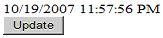
The result is a simple page with a label and a button with the label showing the time when the page was loaded. When we hit the Update button the whole page reloads and the current time is displayed in the label. What really happens is that clicking on the button triggers a postback so the Page Load handler is reached and the lblTime's Text property is updated with the current time.

Ok until now... everything looks good... but the label only displays the time of a specific moment and to update it you have to hit the Update button which reloads the whole page. This is not very appealing.

Let's now modify a bit the application, so it makes use of Microsoft AJAX.

Notice that once the AJAX Extension was installed on the system a new tab was created in the Toolbox with some items. There are basic controls you need to create interactivity with AJAX.

One of the most used controls among them is the "UpdatePanel". UpdatePanel is a very powerful control because all the controls that are nested within this control are automatically updated without page reload.

Drag an UpdatePanel in the page and move the lblTime and the btnUpdate controls in this control so the aspx code behind looks something like this:

<form id="form1" runat="server">
<asp:ScriptManager ID="ScriptManager1" runat="server">
asp:ScriptManager>
<asp:UpdatePanel ID="UpdatePanel1" runat="server">
<ContentTemplate>
<asp:Label ID="lblTime" runat="server" Text="Label">asp:Label>
br>
<asp:Button ID="btnUpdate" runat="server" Text="Update" />
ContentTemplate>
asp:UpdatePanel>
form>

Now, let's enjoy the result. When running the application the Update button updates the time in but without reloading the entire page so that the change happens smoothly. As you see, this is a major improvement.

But the real purpose of a time indicator is to display the current time, and ours only displays the current time when the Update button is hit. So, let's further improve our application.

Delete the btnUpdate control from the page and add a Timer control from the AJAX Extensions Toolbar tab to the UpdatePanel in the page and set its "Interval" property to 1000. The Timer control in the AJAX Extensions triggers an postback at a specified amount of time. This is what we've done here: we're telling the page to reload itself every second. But thanks to the UpdatePanel in which this Timer is located only the UpdatePanel is reload.

Now the aspx code should look like this:

<form id="form1" runat="server">
<asp:ScriptManager ID="ScriptManager1" runat="server">
asp:ScriptManager>
<asp:UpdatePanel ID="UpdatePanel1" runat="server">
<ContentTemplate>
<asp:Label ID="lblTime" runat="server" Text="Label">asp:Label>
<asp:Timer ID="Timer1" runat="server" Interval="1000">
asp:Timer>
ContentTemplate>
asp:UpdatePanel>
form>

And now the page displays a fully functional clock: it updates each second to display the current time. This is possible because the default value of the "UpdateMode" property is set to "Always": this tells the UpdatePanel to update itself each time one of its child controls causes a postback. The other option for the UpdateMode property is "Conditional". In order to build rich interactive user interfaces you must fully understand the functionality of the UpdatePanel. So let's modify a little bit our application and observe the changes.

Let's assume that the timer is placed outside the UpdatePanel. In a real world application this a frequent situation as we can't always have a control reside inside an UpdatePanel or we want an external control to update the UpdatePanel. In this situation the timer updates each second but the whole page is reloading (you can make this more obvious by adding a large dummy text outside the UpdatePanel).

To achieve the smooth update applied only to the UpdatePanel we have to add an "AsyncPostBackTrigger" element to the "Triggers" tag of the UpdatePanel and set the controlID to "Timer1" (which is the name of the timer in our page) and the "EventName" to "Tick" as Tick is the event raised by the timer each time it triggers an postback. Now the aspx code should look something like this:

<form id="form1" runat="server">
<asp:ScriptManager ID="ScriptManager1" runat="server">
asp:ScriptManager>
<asp:UpdatePanel ID="UpdatePanel1" runat="server" UpdateMode="Conditional">
<Triggers>
<asp:AsyncPostBackTrigger ControlID="Timer1" EventName="Tick" />
Triggers>
<ContentTemplate>
<asp:Label ID="lblTime" runat="server" Text="Label">asp:Label>
ContentTemplate>
asp:UpdatePanel>
<asp:Timer ID="Timer1" runat="server" Interval="1000">
asp:Timer>
form>

This is a basic yet complete example of how to use UpdatePanel and Timer controls and the Partial page update pattern to transform a classic ASP.NET page into an AJAX-enabled one.
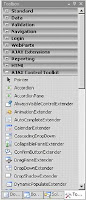


Now, we shall focus on the AJAX Control Toolkit, a free library of AJAX-enabled controls. You can download it from http://www.asp.net, click the Download button then scroll the page to the ASP.NET AJAX Control Toolkit section and hit "Download the toolkit" button. This will redirect you to the Codeplex website from where you can download the toolkit. I suggest downloading the AJAX Toolkit along with the source code as you may want in the future to modify the existing controls to match your expectations. Notice that the file being downloaded is a zip file, no msi, no installer. Extract the content of the zip file and you shall find a VS solution that you must build. You shall find the result in the bin directory. Now open Visual Studio, right-click the Toolbox and select "Add tab".

Name it whatever you want or simply "AJAX Control Toolkit" and then right-click it and select "Choose Items". Navigate to the bin directory and select AjaxControlToolkit.dll. This will populate the newly created tab with AJAX-Enabled controls. Now your Toolbox should look like image above.

Next we shall build another website that uses controls found in the AJAX Control Toolkit.

Create a new project, add an TextBox and Label and a Button to the page and then add the following code to the button's Click handler:

[ C# ]

Label1.Text=TextBox1.Text;

[ VB.NET ]

Label1.Text=TextBox1.Text

Now, drag a ConfirmButtonExtender control and set its ConfirmText property to "Are you sure?" and TargetControlID property to Button1. What this controls does is that when the button is clicked it pops up a confirmation dialog with the specified text and an OK and a Cancel button. Only if the OK button is pressed the execution of the button's handler is executed as you see in image bellow.
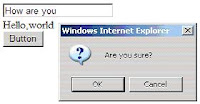


As the name says ConfirmButtonExtender extends the functionality of a Button. The library contains a lot of other amazing and complex controls like: Accordion, TabContainer, CalendarExtender etc.

It is easy to create AJAX-enabled pages in Visual Studio. On the ASP.NET official website (http://www.asp.net ) in the AJAX section you can find complete documentation on each control and even watch the controls live prooving their power. Use them to create a better user experience and ensure the kind of interactivity you've always wanted to create on the web.

Labels: , , , ,

posted by WebTeks @ 3:11 AM   0 comments
Monday, March 12, 2007
Download free e-books
Click here to download free e-books of AJAX

Click here to download free e-books of HDD, Java, Excel, 3D Studio Max, Flash, Website Design Guide, C++, HTML, CGI

Click here - Free Computer Books, Tutorials & Lecture Notes

Labels: , , , ,

posted by WebTeks @ 2:25 AM   1 comments
Sunday, March 4, 2007
AJAX ebook series
Ajax, or Asynchronous JavaScript and XML, exploded onto the scene in the spring of 2005 and remains the hottest story among web developers. With its rich combination of technologies, Ajax provides a strong foundation for creating interactive web applications with XML or JSON-based web services by using JavaScript in the browser to process the web server response. Ajax Design Patterns shows you best practices that can dramatically improve your web development projects. It investigates how others have successfully dealt with conflicting design principles in the past and then relays that information directly to you.

Building on what you already know, this fast-paced guide will show you exactly how to create rich, usable Internet applications. Joshua Eichorn teaches through sophisticated code examples, including extensive server-side PHP code.

This detailed guide covers the creation of connections to a MySQL database with PHP 5 via a custom Ajax engine and shows how to gracefully format the response with CSS, JavaScript, and XHTML while keeping the data tightly secure. It also covers the use of four custom Ajax-enabled components in an application and how to create each of them from scratch.

Create Web applications that act like desktop ones Brush up on JavaScript, use free Ajax frameworks, and make your sites rock What if shoppers at your online store could fill their carts without waiting for multiple page refreshes? What if searches produced instant results on the same page? With this book you won’t have to wonder “what if” - you can use Ajax to make it happen! Get the scoop on all the technologies and start cranking out great applications.

This book is for programmers who use ASP.NET and are just starting to use Ajax technologies to create more responsive, modern applications. Wrox Beginning guides are crafted to make learning programming languages and technologies easier than you think, providing a structured, tutorial format that will guide you through all the techniques involved.

Sams Teach Yourself Ajax in 10 Minutes is a concise introduction to the basics of building Ajax applications and the architecture and operation of these applications. You will learn the techniques employed in using Ajax, introducing Ajax and explaining how it may be used to solve realistic user interface problems. You will be able to immediately begin building web applications, and will have platform from which to explore more advanced aspects of Ajax.

Ajax Patterns and Best Practices explores dynamic web applications that combine Ajax and REST as a single solution. A major advantage of REST is that like Ajax, it can be used with today’s existing technologies.

Labels: , , ,

posted by WebTeks @ 8:06 PM   0 comments
Friday, March 2, 2007
Free AJAX Resources: Source Code, Tools, Libraries and Frameworks - II
The Code Project -Free articles & source code of Atlas and AJAX

Ajax.NET - A free library for the Microsoft .NET Framework -Examples using the free Ajax.NET library

W3Schools.com -An AJAX tutorial from the helpful people at W3Schools.

18-Week Free AJAX Programming (with Passion!) Online Course -The first session of this free online AJAX course is already underway, but there are slides and various other resources available. This is a Java site so the AJAX course ultimately involves JavaServer Faces and AJAX integration.

Creating a MySQL connection with PHP/AJAX -This is a short ajax tutorial on opening a connection to MySql using ajax.

Getting Started with Ajax -This article at A List Apart is an excerpt from the book Web Design in a Nutshell and covers using ajax with innerHTML and Nodes to manipulate page content dynamically.

SAJAX -SAJAX is an open source tool to make programming websites using the Ajax framework also known as XMLHTTPRequest or remote scripting as easy as possible. Sajax makes it easy to call PHP, Perl or Python functions from your webpages via JavaScript without performing a browser refresh.

NAJAX -This package can be used to call PHP classes on the Web server side from Javascript code in Web pages. It uses AJAX technology to submit HTTP requests from Javascript to pass call parameters and collect and process the responses.

Labels: , , , , , ,

posted by WebTeks @ 7:15 PM   0 comments
Free AJAX Resources: Source Code, Tools, Libraries and Frameworks - I
AJAX web applications, made famous by GMail and Google Maps, seem to be the flavour of the month in some circles. Using a combination of HTML/XHTML, XML, CSS, DOM scripting via JavaScript, and XMLHttpRequest (for exchanging data with a server asynchronously), AJAX allows you to do many interactive things with your website, making it appear almost like a native application running on your system. Incidentally, in case you were wondering, AJAX is an acronym for "Asynchronous JavaScript and XML".

If you are looking for a tutorial on Ajax, you might want to try the following online articles from IBM:
* Mastering Ajax, Part 1: Introduction to Ajax
* Mastering Ajax, Part 2: Making asynchronous requests with JavaScript and Ajax
* Mastering Ajax, Part 3: Advanced requests and Responses in Ajax

Free AJAX Toolkits, Frameworks, Libraries and Source Code

Google Web Toolkit - Build AJAX applications in the Java language
Google Web Toolkit helps you in developing AJAX web applications like Google Maps and Gmail by taking care of many of the browser dependencies under the hood. Your applications are built using Java, and the toolkit translates it into JavaScript and HTML that works across a number of browsers, including IE, Firefox, Opera, Mozilla and Safari. You can also intermix JavaScript into your code. Other features include the ability to create widgets and lay out widgets, debug your applications using advanced Java debugging facilities, simple remote procedure calls (RPCs), automatic management of the browser's back button, etc.

Yahoo! User Interface Library
Yahoo! supplies a number of utilities and controls for use in your AJAX and DHTML web applications. They are released under a BSD licence. The library is written in JavaScript. The library features a calendar, containers (which includes tooltips, dialogs, etc), menus, sliders, treeviews, autocomplete, a drag and drop utility, an animation utility, CSS fonts, CSS page grids, and so on.

Yahoo! Design Pattern Library
The Yahoo! Design Pattern Library features a variety of patterns, which are defined by them as optimal solutions to common problems. Each problem comes with text describing the solution. Among the many patterns described are animation transitions, collapse transitions (such as when you want to collapse an item on a page), dim transitions, expand transitions, fade-in transitions, self-healing transitions, slide transitions, spotlight transitions, page grids, tool tips, hover, etc.

Microsoft ASP.NET Atlas
Microsoft's Atlas is primarily for developers to create ASP.NET pages that use AJAX. You will need to have either Visual Studio 2005 or have the free version of Visual Studio 2005 Express.

ZK Ajax but no JavaScript
ZK allows you to create your Ajax applications using XUL and XHTML components and manipulate them by listening to events triggered by visitors to your site. Your application runs on the server side with only the visual user interface at the client side (browser). Scripting is done with Java. ZK is relased under the GPL.

Dojo, the JavaScript Toolkit
Dojo is a library for JavaScript that may help speed up your development of JavaScript web applications by providing components that you can use to add functionality to your web pages and make them more responsive and usable. It supports Safari 2.0.x+, Opera 8.5+, Firefox 1.0+ (as well as Mozilla), Konqueror 3.5+ as well as Internet Explorer 5.5+ (Windows).

Labels: , , , , ,

posted by WebTeks @ 6:42 AM   0 comments
Putting AJAX to Web Development
AJAX Definition-
AJAX (Asynchronous JavaScript and XML) is a web development technique for creating interactive web based applications that can asynchronously interchange data between server and client

How it works?
When an application uses AJAX, a new layer is added to the communication model. In the classic web application, communication between the client (the browser) and the web server were performed directly, using HTTP requests.

When the visitor requests a page, the server will send the full HTML and CSS code at once. After the visitor fills in a form and submits it, the server processes the information and rebuilds the page. It then sends the full page back to the client. And so on.

When using AJAX, the page is loaded entirely only once, the first time it is requested. Besides the HTML and CSS code that make up the page, some JavaScript files are also downloaded: the AJAX engine. All requests for data to the sever will then be sent as JavaScript calls to this engine. The AJAX engine then requests information from the web server asynchronously. Thus, only small page bits are requested and sent to the browser, as they are needed by the user. The engine then displays the information without reloading the entire page. This leads to a much more responsive interface, because only the necessary information is passed between the client and server, not the whole page. This produces the feeling that information is displayed immediately, which brings web applications closer to their desktop relatives.

Use of AJAX to reduce network traffic is spreading fast, especially in regions where customers and clients aren't always able to access applications over broadband connections.

At glance, AJAX may seem best suited for consumer-facing applications. Google Maps, Gmail, New Rediffmail, New Yahoomail are all fine examples of how AJAX can add some glitz to a Web site's UI. For enterprise applications, however, it can be difficult to see how AJAX can provide enough real benefit to offset the risks involved in adopting a new, complex form of Web development.

Labels: , ,

posted by WebTeks @ 1:28 AM   0 comments
Previous Post
Archives
Links
Template by

Free Blogger Templates

BLOGGER

Subscribe in NewsGator Online Subscribe in Rojo Add to Google Add to netvibes Subscribe in Bloglines Web Developement Blogs - BlogCatalog Blog Directory Blogarama - The Blog Directory Blog Directory & Search engine Computers Blogs - Blog Top Sites Top Computers blogs